UntungLab
Untuk peniaga makanan rumahFor home food businesses

Jual RM6. Untung sebenar berapa?Sell at RM6. What do you really earn?

UntungLab kira kos sebenar setiap menu anda: bahan, pembungkusan, masa dan kos operasi seperti sewa dan api. Anda terus nampak untung sebenar, dan harga yang patut dijual.UntungLab works out the real cost of every item on your menu: ingredients, packaging, your time and running costs like rent and utilities. You see your true profit, and the price you should charge.
Tiada akaun, tiada log masuk. Data kekal di telefon anda. Boleh digunakan tanpa internet.No account, no login. Your data stays on your phone. Works without internet.
The app itself is currently in Bahasa Melayu.
Dashboard UntungLab
MasalahnyaThe problem

Kos bahan sahaja tidak cukup.Ingredient cost alone is not enough.

Kebanyakan peniaga kira untung dengan menolak kos bahan daripada harga jual. Sewa, elektrik, gas, bungkusan dan masa anda sendiri terlepas pandang, jadi untung nampak besar tetapi sebenarnya kecil.Most sellers work out profit by taking ingredient cost off the selling price. Rent, electricity, gas, packaging and your own time get missed, so profit looks big when it is really small.

Anggaran biasaUsual estimateRM5.09harga jual tolak kos bahanselling price minus ingredients
Untung sebenarReal profitRM1.35selepas semua kos, 22.5% marginafter all costs, 22.5% margin
ContohExampleBrownies RM6nombor sebenar daripada enjin UntungLabreal numbers from the UntungLab engine
1. Bahan1. Ingredients

Isi harga pek dan kuantiti. Kos seunit keluar sendiri.Enter pack price and quantity. Unit cost appears by itself.

Beli butter 250 g RM12? UntungLab tahu itu RM48 sekilogram dan kira kos bahan dalam resipi anda. Tak perlu kalkulator.Bought 250 g of butter for RM12? UntungLab knows that is RM48 a kilo and works out the cost in your recipe. No calculator needed.
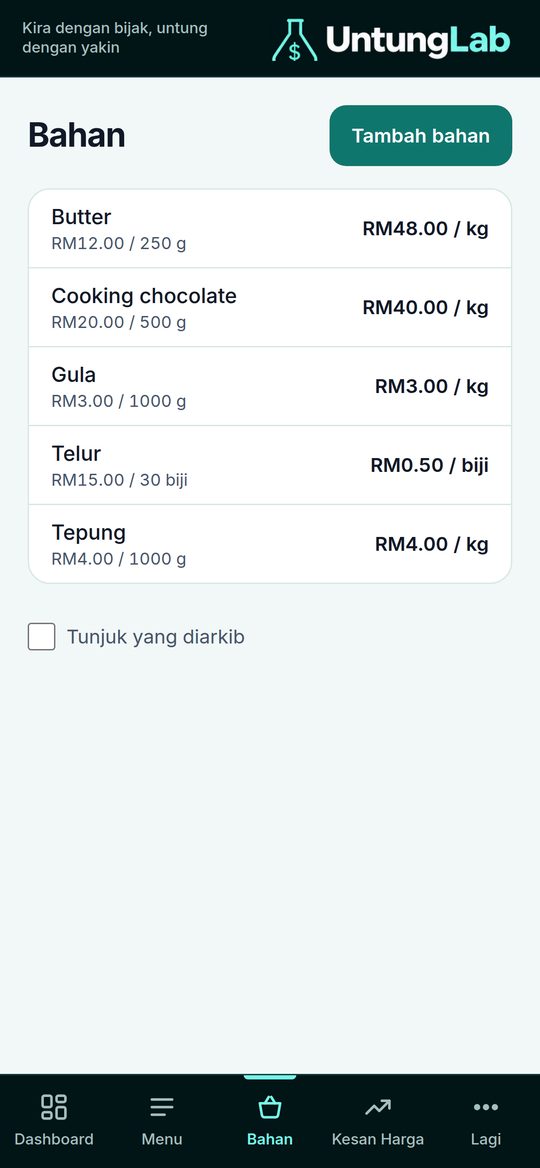
Senarai bahan dengan harga
2. Kos operasi2. Running costs

Sewa, api dan air pun dikira.Rent, power and water are counted too.

Masukkan kos bulanan perniagaan anda sekali sahaja. UntungLab membahagikannya kepada setiap menu dengan cara yang adil, jadi harga anda menanggung semuanya.Enter your monthly business costs once. UntungLab spreads them fairly across every menu item, so your price covers everything.
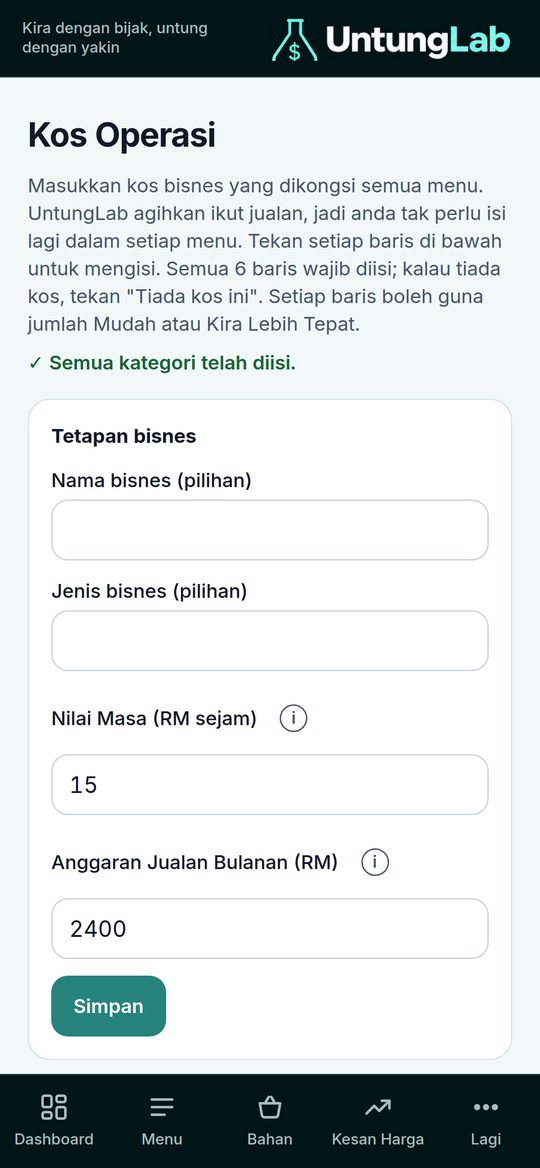
Skrin kos operasi
3. Hasil3. Results

Untung sebenar. Bukan tekaan.Real profit. Not guesswork.

Kos sebenar, untung sebiji dan margin, dengan status yang jelas seperti Margin Sihat, Margin Rendah atau Menu Ini Rugi.Real cost, profit per piece and margin, with clear statuses such as Healthy Margin, Low Margin or This Item Loses Money.
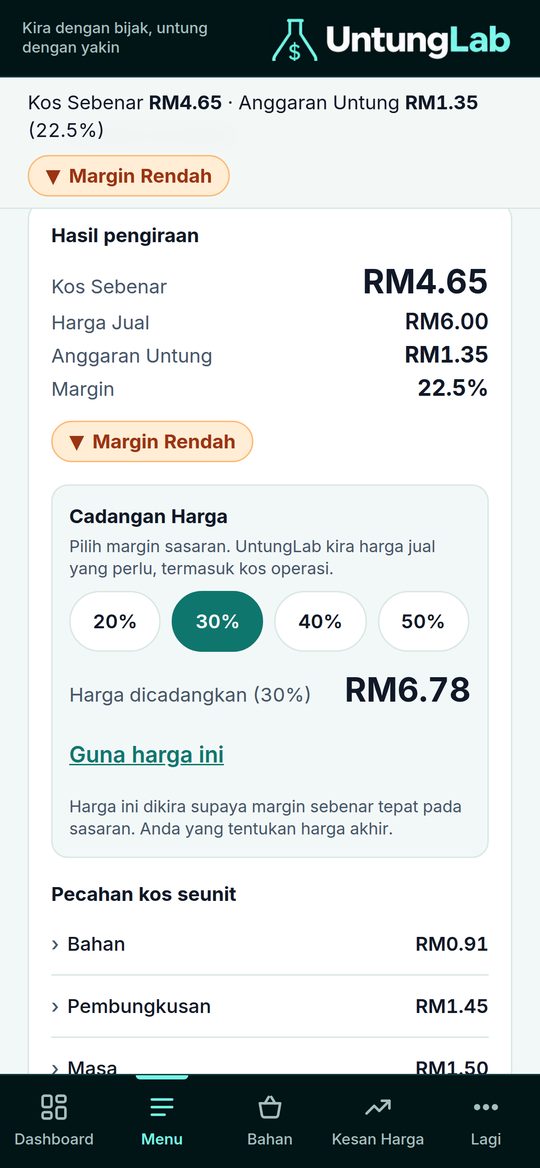
Skrin hasil pengiraan
4. Cadangan harga4. Price suggestion

Pilih margin. Harga terus keluar.Pick a margin. The price appears.

Nak untung 20%, 30%, 40% atau 50%? Satu ketikan dan UntungLab beritahu harga yang patut dijual, dikira daripada kos sebenar anda.Want 20%, 30%, 40% or 50% profit? One tap and UntungLab tells you the price to charge, worked out from your real cost.
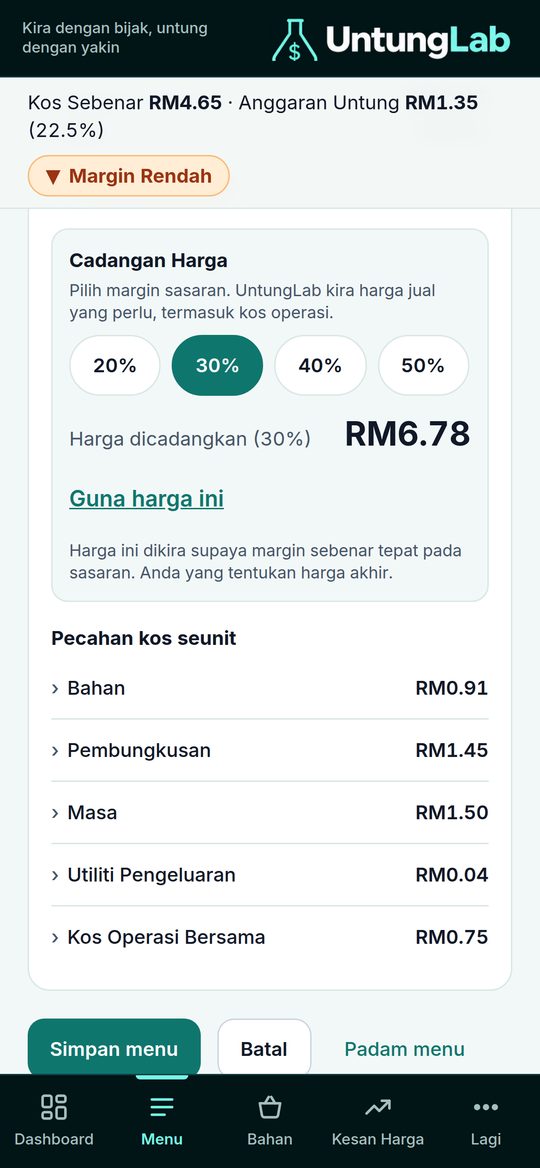
Skrin cadangan harga
5. Dashboard5. Dashboard

Semua menu. Satu skrin.Every item. One screen.

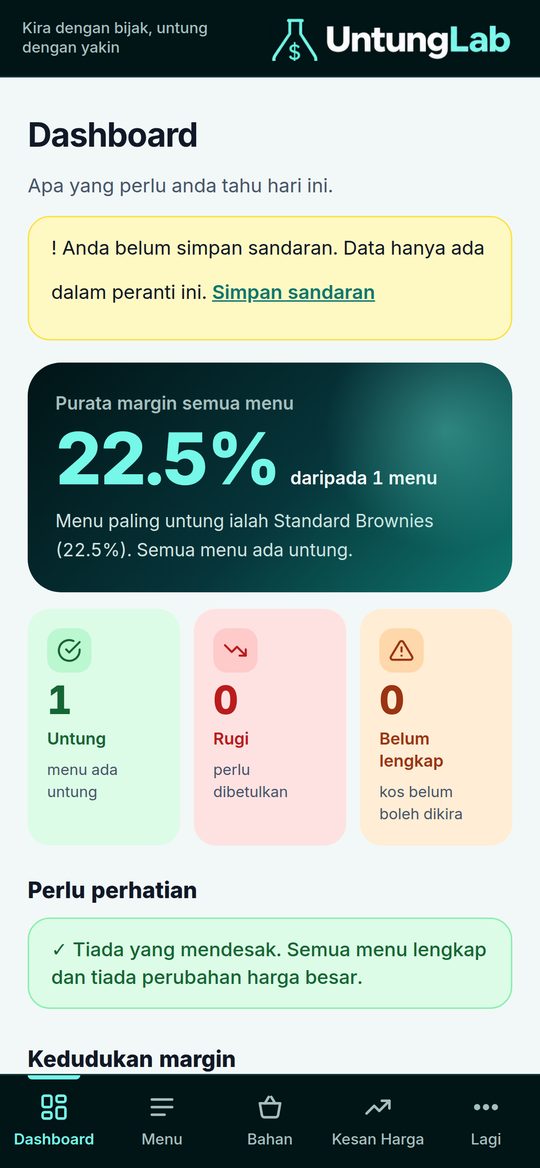
Nampak menu mana yang menguntungkan dan mana yang rugi, serta purata margin perniagaan anda.See which items make money and which lose it, plus the average margin of your business.

Dashboard semua menu

Dibina supaya mudah dan selamat.Built to be simple and safe.

Tiada langganan bulanan. Tiada data anda dihantar ke mana-mana.No monthly subscription. None of your data is sent anywhere.

Tanpa akaunNo accountBuka dan guna. Tiada pendaftaran atau kata laluan.Open and use it. No sign-up or password.
Data di telefon andaData on your phoneResipi dan harga anda kekal pada peranti anda. Ada fungsi sandaran bila anda tukar telefon.Your recipes and prices stay on your device. There is a backup function for when you change phones.
Boleh luar talianWorks offlinePasang ke skrin utama seperti app dan guna walaupun tiada internet.Add it to your home screen like an app and use it even without internet.
Cara pasangHow to install

Pasang di skrin utama. Dua minit sahaja.Add it to your home screen. Two minutes.

UntungLab ialah app web. Tiada Play Store atau App Store. Anda hanya perlu tambah ke skrin utama sekali, dan ia akan jadi seperti app biasa. Ikut gambar bernombor di bawah.UntungLab is a web app. There is no Play Store or App Store. Just add it to your home screen once and it behaves like a normal app. Follow the numbered pictures below.

iPhone / iPad

Guna SafariUse Safari

UntungLab untunglab.space 1 UntungLab U UntungLab SalinCopy Tambah ke Skrin UtamaAdd to Home Screen Tambah PenandaAdd Bookmark 2
  1. Buka UntungLab di Safari.Open UntungLab in Safari.
  2. Tekan butang Kongsi (kotak dengan anak panah ke atas) di bawah skrin.Tap the Share button (a box with an arrow pointing up) at the bottom of the screen.
  3. Tatal dan pilih Tambah ke Skrin Utama.Scroll and tap Add to Home Screen.
  4. Tekan Tambah. Ikon UntungLab muncul di skrin anda.Tap Add. The UntungLab icon appears on your screen.

Android

Guna ChromeUse Chrome

UntungLab untunglab.space 1 UntungLab Tab baharuNew tabSejarahHistory Pasang appInstall app TetapanSettingsBantuanHelp 2
  1. Buka UntungLab di Chrome.Open UntungLab in Chrome.
  2. Tekan menu ⋮ (tiga titik) di penjuru atas.Tap the ⋮ menu (three dots) at the top corner.
  3. Pilih Pasang app atau Tambah ke skrin utama.Choose Install app or Add to Home screen.
  4. Tekan Pasang. Ikon UntungLab muncul di skrin anda.Tap Install. The UntungLab icon appears on your screen.
Keluar amaran "app tidak selamat"?See an "unsafe app" warning? Itu amaran biasa Android / Google Play Protect untuk app yang dipasang dari web, bukan dari Play Store. UntungLab tidak mengambil data anda; semuanya kekal di telefon. Tekan Lagi butiran (More details), kemudian Pasang juga (Install anyway). Jika anda tidak pasti, anda boleh terus guna UntungLab di Chrome tanpa memasangnya.This is a normal Android / Google Play Protect warning for apps installed from the web instead of the Play Store. UntungLab does not collect your data; everything stays on your phone. Tap More details, then Install anyway. If you are unsure, you can simply keep using UntungLab inside Chrome without installing it.

KomputerComputer

Chrome atau EdgeChrome or Edge

untunglab.space UntungLab 1 untunglab.space UntungLab U Pasang UntungLab?Install UntungLab? BatalCancel PasangInstall 2
  1. Buka UntungLab di Chrome atau Edge.Open UntungLab in Chrome or Edge.
  2. Cari ikon Pasang di hujung bar alamat (atas, sebelah kanan).Look for the Install icon at the end of the address bar (top right).
  3. Atau tekan menu ⋮ dan pilih Pasang UntungLab.Or open the ⋮ menu and choose Install UntungLab.
  4. Tekan Pasang. UntungLab buka dalam tetingkapnya sendiri.Click Install. UntungLab opens in its own window.
Penting: pasang dan buka sekali semasa ada internet, supaya app boleh dipakai tanpa internet selepas itu. Data anda disimpan di peranti itu sahaja, jadi pasang di telefon yang anda guna untuk berniaga. Selepas bayar, kod lesen diaktifkan di dalam app (Lesen).Important: install and open it once while you have internet, so the app works offline afterwards. Your data is stored on that device only, so install it on the phone you use for your business. After paying, the licence code is activated inside the app (Lesen / Licence).
Beli UntungLabBuy UntungLab

Kira betul. Untung jelas.Count it right. Profit made clear.

RM1

Bayar sekali, guna selamanya.Pay once, use it for good.

  • Akses seumur hidup, bayaran sekali sahajaLifetime access, one payment only
  • Boleh digunakan pada 2 perantiUse it on 2 devices
  • Semua fungsi: kos operasi, hasil, cadangan harga, dashboardAll features: running costs, results, price suggestion, dashboard
  • Kod lesen dihantar ke emel anda selepas bayaranLicence code sent to your email after payment
  • Bayaran balik dalam 7 hari jika tidak sesuai7-day refund if it is not for you

Pembayaran selamat melalui ToyyibPay (FPX). Bayaran balik dalam 7 hari selepas pembelian: balas emel kod lesen anda.Secure payment through ToyyibPay (FPX). Refund within 7 days of purchase: reply to your licence code email.

Nama, emel dan telefon anda hanya digunakan untuk menghantar kod lesen dan sokongan pembelian ini.Your name, email and phone are used only to send the licence code and support this purchase.

Soalan lazimFAQ

Adakah saya boleh cuba dahulu?Can I try it first?

Boleh. Versi percuma membuka semua fungsi, dengan had bilangan: 2 menu, 10 bahan dan 2 pembungkusan. Beli bila anda sudah yakin.Yes. The free version unlocks every feature, with count limits: 2 menu items, 10 ingredients and 2 packaging items. Buy when you are confident.

Apa maksud akses seumur hidup?What does lifetime access mean?

Anda bayar sekali dan tiada yuran bulanan. Akses seumur hidup bermaksud selagi produk UntungLab beroperasi.You pay once and there is no monthly fee. Lifetime access means for as long as the UntungLab product is operating.

Berapa peranti boleh digunakan?How many devices can I use?

Satu kod lesen boleh digunakan pada 2 peranti, contohnya telefon dan tablet anda.One licence code works on 2 devices, for example your phone and your tablet.

Bagaimana kalau saya tukar telefon?What if I change phones?

Data disimpan di telefon anda. Buat sandaran dalam UntungLab sebelum menukar telefon, kemudian pulihkan di telefon baharu dan masukkan kod lesen yang sama.Your data is stored on your phone. Make a backup inside UntungLab before changing phones, then restore it on the new phone and enter the same licence code.

Perlukah internet?Do I need internet?

Hanya untuk membeli dan mengaktifkan kod lesen sekali. Selepas itu UntungLab boleh digunakan tanpa internet.Only to buy and to activate the licence code once. After that UntungLab works without internet.

Bagaimana dengan bayaran balik?What about refunds?

Dalam 7 hari selepas pembelian, balas emel kod lesen anda dan kami akan uruskan bayaran balik.Within 7 days of purchase, reply to your licence code email and we will handle the refund.

Adakah data saya dihantar kepada anda?Is my data sent to you?

Tidak. Resipi, bahan dan harga anda kekal pada peranti anda. Hanya nama, emel dan telefon digunakan untuk menghantar kod lesen dan sokongan pembelian.No. Your recipes, ingredients and prices stay on your device. Only your name, email and phone are used to send the licence code and support the purchase.

Adakah app ini ada dalam Bahasa Inggeris?Is the app available in English?

Buat masa ini app dalam Bahasa Melayu sahaja.For now the app is in Bahasa Melayu only.

BeliBuy RM1